
Long Tail Keyword Generator Tool – SEMrush
Last modified: October 29, 2026

A long tail keyword generator is a tool that takes one broad topic and returns the longer, more specific phrases people actually search, the ones with lower competition and clearer intent. For a WordPress blog that is where the realistic traffic lives, because a newer or mid-sized site rarely outranks big brands for a two-word head term but can win a four or five word long tail phrase. This guide compares the main tools, free and paid, and walks through a full example that starts with one seed word and ends with a shortlist you can write posts around.
Long tail keyword generators compared
Here is a quick comparison of the tools most WordPress bloggers reach for. Pick based on your budget and how much data you need.
| Tool | Best for | Free option | Long tail data |
|---|---|---|---|
| SEMrush Keyword Magic Tool | Depth and accurate volume | 14 day trial | Phrase match plus related, millions of variations |
| Google Keyword Planner | Google ad volume | Yes, with an account | Volume ranges unless you run ads |
| Google autocomplete and People Also Ask | Quick, real queries | Yes, fully free | Real phrases, no volume numbers |
| AnswerThePublic | Question phrases | Limited free searches | Question and preposition long tails |
What is a long tail keyword?
A long tail keyword is a search phrase of roughly three or more words that targets a narrow, specific intent. “Keyword tool” is a head term. “Free long tail keyword tool for a WordPress blog” is a long tail phrase. Each individual long tail keyword gets fewer searches, but there are far more of them, they convert better because the intent is clear, and they are easier to rank for. For WordPress SEO, stacking dozens of long tail posts usually beats chasing one competitive head term.
How to find long tail keywords for a WordPress blog
You do not need a paid tool to start. This is the process, with a worked example around the seed term “wordpress backup”.
- Start with a seed term. Pick the broad topic of your post, for example “wordpress backup”.
- Add modifiers. Put intent and qualifier words in front of or after the seed: best, how to, free, plugin, without a plugin, for beginners, 2026. That turns one seed into “best wordpress backup plugin”, “how to backup a wordpress site for free”, and “wordpress backup without a plugin”.
- Mine Google autocomplete. Type the seed into Google and read the suggestions. These are real phrases people search. Add a letter after the seed (“wordpress backup a”, “wordpress backup b”) to pull even more.
- Read People Also Ask. Search the seed and open the People Also Ask box. Every question there is a long tail phrase and a ready-made subheading, such as “how do I backup my entire wordpress site”.
- Filter by difficulty. Drop the candidates into a keyword generator and sort by keyword difficulty. Keep the phrases under about 30 difficulty that still have steady volume, and drop the rest.
From that one seed, a realistic shortlist for a new blog might be “how to backup a wordpress site for free”, “best wordpress backup plugin for beginners”, “wordpress backup without a plugin”, and “schedule automatic wordpress backups”. That is four specific, winnable posts instead of one impossible run at “wordpress backup”.
What is a Good Google Keyword Tool Alternative?
When you need deeper data than the free methods give, a dedicated tool helps. Most marketers reach for the Google keyword tool when they start keyword research, but it has real limits for long tail work, which is why a common question in SEO forums is this one.
One of the reasons so many people ask it is that a while ago Google changed how the keyword tool works, and now you see accurate search volume only if you have an active Adwords campaign running. If you do not, you only see a range. It is hard to make firm decisions when the data is not accurate. In comes SEMrush’s keyword tool. If you aren’t familiar with SEMrush, you can read our SEMrush review here.
Use this link to get a 14 day free trial
SEMrush’s keyword tool is very similar to the Google keyword planner, but it gives us more information than Google does. All you need to do is add a starting point keyword and the tool returns its recommendations and search volume.
Let’s say I search for “WordPress”, this is what we will see:
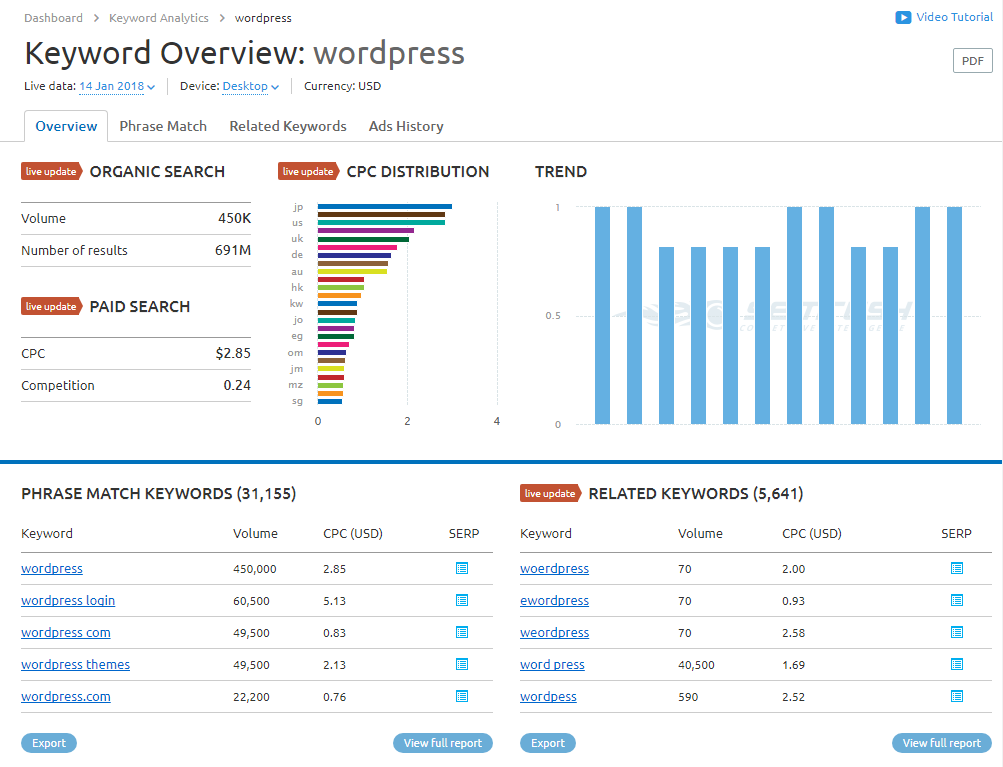
Definitely more than Google. The top area gives us information about the phrase “WordPress” itself.
- Search volume
- Amount of results
- CPC distribution by country
- Search trend
Below that we have the beginning of long tail keywords based on our main keyword. These keywords all contain our main keyword in them. Besides that, we have the “related keywords”, which are long tail keywords that have similar keywords in them, as you can see in the screenshot. This is great for finding typos that you can take advantage of.
Below this section you can see the top 100 results for our query, all the ad copies and the number of ads historically.
The two sections that should interest us most when we need a long tail keyword generator are:
- Phrase match
- Related keywords
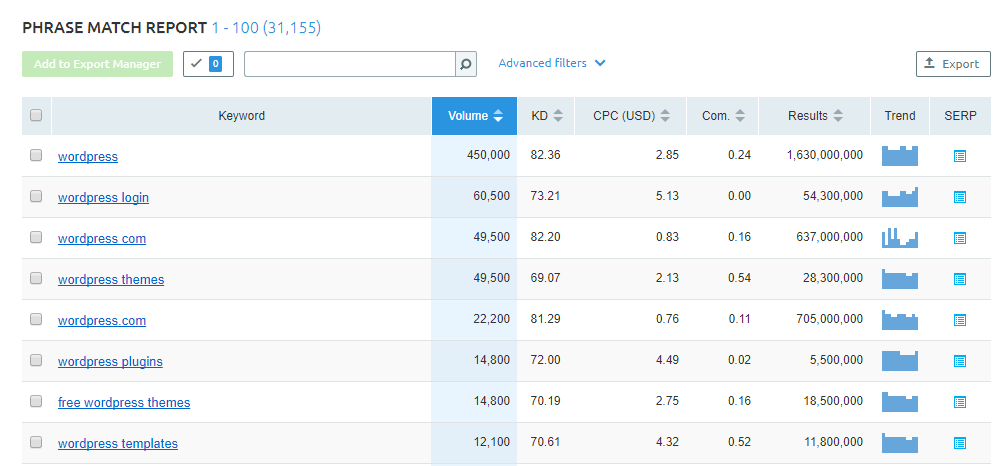
Clicking “Phrase match” shows you a table of long tail keywords that contain our main keyword. Since it is “Phrase match” it won’t show you similar or relevant keywords without the main keyword in them. Below you can see the “Phrase match” for the keyword “WordPress”.
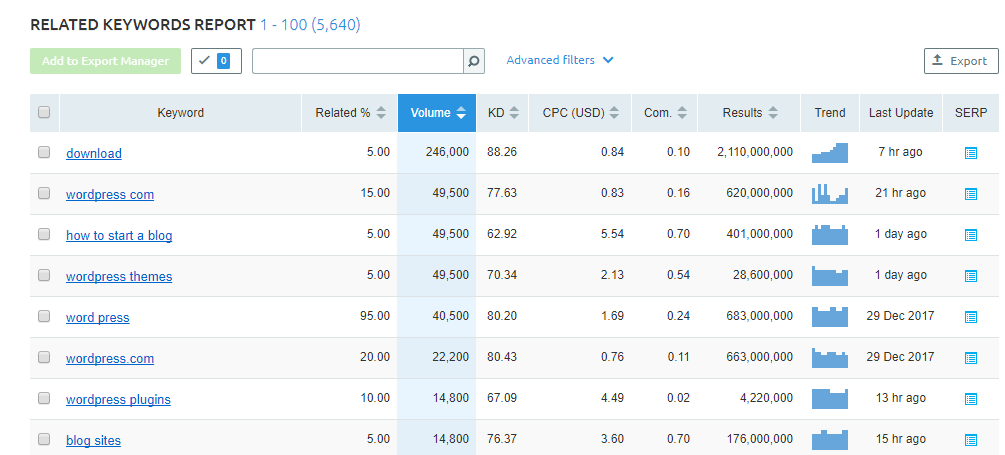
Clicking “Related keywords” shows the image below. As you can see, while there ARE long tail keywords that contain the keyword “WordPress”, they don’t all contain it. Some have different spelling options and some are just keywords relevant to the main subject, which in our case is “WordPress”.
As you can see, it is pretty simple. All you have to do is sign up for a free 14 day trial and start doing some high quality keyword research.
Free long tail keyword generator options
If a paid subscription is not an option yet, you can still build a strong list for free:
- Google autocomplete: free, and it reflects real searches as they happen.
- People Also Ask: a free source of question-style long tail phrases straight from the results page.
- Google Keyword Planner: free with a Google account, though it shows volume as a range unless you run ads.
- SEMrush free trial: full access to phrase match and related keywords during the 14 day trial, which is enough to pull a few months of ideas in one sitting.
Keyword generator vs keyword planner: what is the difference?
People use the two terms loosely, but there is a practical difference. Google Keyword Planner is built for advertisers, so it groups search volume into ranges and leans toward commercial terms. A keyword generator like the SEMrush Keyword Magic Tool is built for content and SEO, so it returns exact long tail variations, questions, and difficulty scores you can act on without running an ad campaign. For blog planning, the generator gives you more usable long tail ideas.
Long tail keyword generator questions
Is there a free long tail keyword generator?
Yes. Google autocomplete and the People Also Ask box are completely free and pull real long tail phrases. Google Keyword Planner is free with an account, and a SEMrush trial gives you paid-level data for 14 days at no cost.
Are long tail keywords easier to rank for?
Usually, yes. They have lower search volume but also lower competition and clearer intent, so a newer WordPress blog can realistically rank on page one for them while head terms stay out of reach.
How many words is a long tail keyword?
There is no hard rule, but most long tail keywords are three or more words. The point is specificity, not length: a precise two-word phrase can still be long tail if the intent is narrow.
Final thoughts
The best long tail keyword generator is the one that fits your budget and gives data you will actually act on. Start free with Google autocomplete and People Also Ask, confirm volume and difficulty in Google Keyword Planner or a SEMrush trial, and turn each specific phrase into its own post. Once you know which long tail topics to target, you can check how competing WordPress sites are built with the ScanWP detector and reverse-engineer the themes and plugins behind the posts that already rank.
Final thoughts
SEMrush is probably the best alternative to the Google keyword planner tool. It gives you more information than Google and is the perfect tool for keyword research and spying on your competitors. You can either click this link to get 14 days free, or start by using their tool right here:
Related Posts




 Website Maintenance – Use Promocode: scanwp
 Advanced JetPlugins for Elementor
 Semrush 14 days trial
 Kinsta – Managed WordPress Hosting
 Bluehost Hosting