
9 Best Contact Form 7 Addons Compared - 2026
Last modified: June 9, 2026

Contact Form 7 is one of the most widely used WordPress form plugins, but it covers the basics — send a form, get an email. If you need to save submissions to a database, accept payments, add conditional logic, build multi-step forms, or connect to your email marketing platform, you’ll need a CF7 addon. This list covers nine of the best, with both free and paid options.
| # | Name | Image | |
|---|---|---|---|
| 1 |
GetResponse
|

|
More Info
|
| 2 |
CFDB7-Database Plugin
|

|
More Info
|
| 3 |
Essential Addons for Contact Form 7
|

|
More Info
|
| 4 |
PayPal and Stripe Addon-WP Free Addon
|

|
More Info
|
| 5 |
Contact Form 7 Skins-Create Unique Contact Forms
|

|
More Info
|
| 6 |
Conditional Fields-Create Conditional Fields in Forms
|
|
More Info
|
| 7 |
Tablesome - Contact Form 7 DB & Mailchimp Addon
|
|
More Info
|
| 8 |
MailChimp for WordPress
|

|
More Info
|
| 9 |
Multi-Step Forms-Create Multi Step Forms
|

|
More Info
|
* This button will show the rest of the post and open up an offer from a vendor
Filter between free and paid
GetResponse
GetResponse is an email marketing platform that connects directly with Contact Form 7. By integrating these two tools, you can automatically capture leads from your WordPress site and add them to your subscriber lists. Whether you’re looking to send newsletters, set up automated email sequences, or segment your audience, the CF7 integration means every form submission can feed straight into your GetResponse account without any manual work.
CFDB7-Database Plugin
CFDB7 is a free Contact Form 7 database plugin that saves form submissions directly to your WordPress database. Contact Form 7 only sends email notifications by default, so if that email fails to deliver or gets caught in spam, the submission is gone. CFDB7 captures every submission independently of email delivery, giving you a permanent record in the WordPress admin. Saved submissions can be exported as CSV files. There’s no configuration required after installation , it automatically picks up all existing CF7 forms. For any site where form submissions have business value (leads, orders, event registrations), CFDB7 is the lowest-friction way to add a submission backup.
The CFDB7 plugin is lightweight so it does not slow down your website, and it is straightforward to use even for non-technical WordPress users.
Essential Addons for Contact Form 7
The Essential Addons for Contact Form 7 plugin is a must-have for users looking to upgrade the functionality of the standard Contact Form 7 plugin. While Contact Form 7 remains one of the most popular form builders for WordPress, it lacks advanced features like conditional logic, multi-step forms, and file uploads,features that modern websites demand.
This plugin extends the capabilities of Contact Form 7, allowing you to create more dynamic, user-friendly, and professional-looking forms without needing additional complex coding or third-party services. From improving form layouts to integrating database storage, this addon ensures that your contact forms serve both visitors and site administrators more effectively.
If you manage an eCommerce store, business website, or service-based platform, this plugin can help you streamline user interactions, collect valuable data, and automate customer engagement.
Key Highlights of Essential Addons for Contact Form 7
Conditional Logic for Smarter Forms
With conditional logic, you can show or hide form fields based on user input. This feature ensures that users only see relevant fields, making the form-filling process more streamlined and efficient. For example, if a user selects “Business Inquiry,” additional fields related to business details can appear dynamically.
Multi-Step Forms for Better User Experience
Long forms can overwhelm users and lead to higher abandonment rates. With the multi-step form feature, you can break long forms into multiple sections, guiding users through the process step by step. This is ideal for complex inquiries, appointment bookings, and surveys.
Drag & Drop File Uploads for Easy Submission
Need to collect documents, images, or PDFs from users? This plugin allows drag-and-drop file uploads, making submissions effortless. Whether you’re gathering resumes for a job application or images for design requests, users can attach files without hassle.
Database Entries for Managing Submissions
Unlike the standard Contact Form 7 setup (which only sends submissions via email), this addon stores form entries directly in your WordPress dashboard. You can access, manage, and export form submissions anytime, ensuring you never lose valuable customer data
PayPal and Stripe Addon-WP Free Addon
The PayPal and Stripe Addon plugin connects both payment gateways directly with Contact Form 7. You can give each contact form its own PayPal and Stripe settings. When a contact form is enabled with PayPal and a user submits the form, it sends the confirmation email and automatically redirects to PayPal for payment. The Stripe integration works the same way. You can also set the charge amount for each contact form in the PayPal settings, which makes it useful for simple paid inquiry forms or registration forms.
Contact Form 7 Skins-Create Unique Contact Forms
Contact Form 7 Skins solves the visual limitation of CF7, which outputs plain, unstyled HTML by default and leaves the appearance entirely to your theme. This plugin adds a drag-and-drop Visual Editor directly within the CF7 interface, so you can build styled, on-brand forms without editing CSS manually. The addon ships with pre-built design templates you can apply immediately, and each template comes with a simple guide for further customization. For WordPress sites where CF7’s default output clashes with the site design, or where non-technical users need to manage forms, Skins removes the CSS dependency entirely and makes form styling accessible to anyone managing the WordPress admin.
Conditional Fields-Create Conditional Fields in Forms
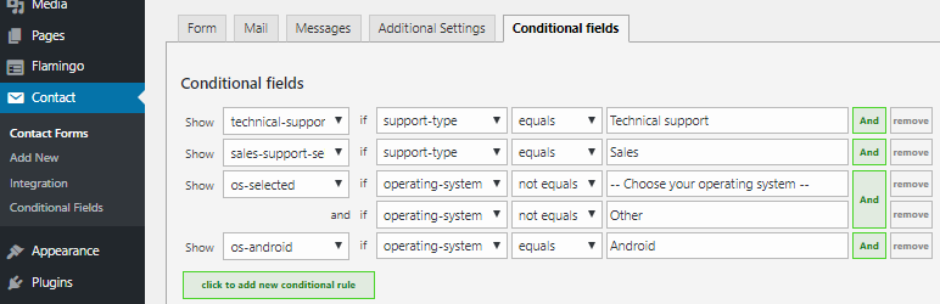
Contact Form 7 Conditional Fields adds if/then logic to CF7 forms: fields appear or hide based on what the user selects. After installation, a new “Conditional Fields Group” tag appears in the CF7 editor. Fields placed inside the group are hidden by default and only show when a trigger condition is met. For example, an address field can appear only when a specific delivery option is selected, or a follow-up field can show based on a checkbox answer. Once conditions are set, the email output also respects the logic, showing or hiding field data based on which groups were visible. For contact forms with multiple user types, booking forms with optional add-ons, or surveys with branching paths, conditional fields keep the form clean and context-relevant.
Tablesome - Contact Form 7 DB & Mailchimp Addon
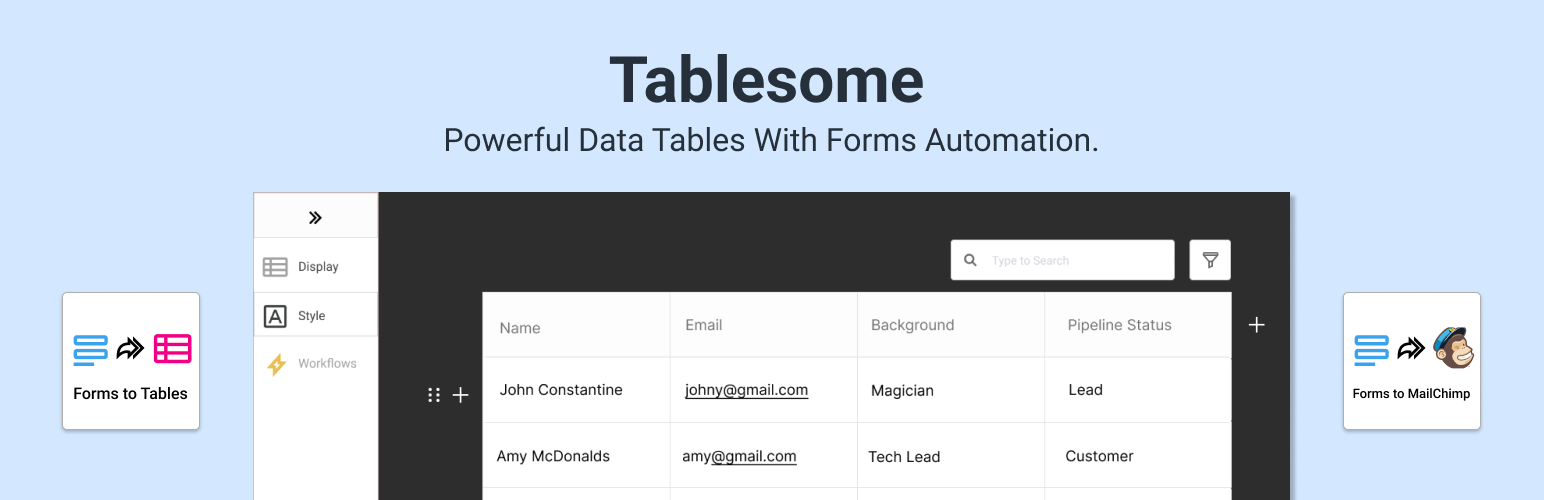
Tablesome plugin is similar to other Contact Form 7 database plugins in this list, but the difference is that it saves the submissions in individual tables. Not only can you save Contact Form 7 submissions to the database, you can also view the form submissions and tables with Search, Sort, and Filters. You can also edit the submissions which is not possible in any other CF7DB add-ons. You could also display the form submission in beautiful tables on WordPress posts and pages
It is also a Contact Form 7 Mailchimp integration plugin as it allows the form submissions from Contact Form 7 plugin to be automatically exported to your Mailchimp audience. Not only Mailchimp integration, Tablesome allows you to automatically export the form entries to external tools using API integrations such as Google Sheets, Notion, Salesforce, and other popular tools.
MailChimp for WordPress
The MailChimp For WordPress plugin lets you grow your Mailchimp list through Contact Form 7 , and through most other major WordPress form plugins. You can create sign-up checkboxes and forms that sync directly with your Mailchimp lists and groups. You might be thinking “didn’t we already discuss a Mailchimp CF7 addon?” , we did (Tablesome above also connects to Mailchimp), but this plugin is the dedicated Mailchimp integration and supports more advanced list management, including segments and merge tags.
Multi-Step Forms-Create Multi Step Forms
Contact Form 7 Multi-Step Forms extends CF7 to span across multiple pages, collecting fields progressively before sending a single email with all the data at the end. The setup follows a straightforward sequence: create a page for each step, build a CF7 form for each step, then configure the flow using the plugin’s multistep button. Each page in the sequence carries forward the data from the previous step so nothing is lost as the user moves through the form. Multi-step forms typically reduce abandonment on longer forms , breaking a 12-field form into three steps of four fields feels far less overwhelming. For lead generation forms, application processes, or onboarding flows where CF7 is already in use, this addon avoids the need to switch to a full premium form builder just to add multi-step functionality. A pro version is available for additional features.
Final Word: Best Contact Form 7 Addons
If you’re not sure where to start, pick based on your most immediate need. For saving form submissions so you don’t lose them if email delivery fails, CFDB7 or Tablesome both handle this well , Tablesome is the better choice if you also want Mailchimp integration. For payment collection, the PayPal and Stripe Addon covers both gateways in one plugin. For more complex forms, Essential Addons for CF7 and the Conditional Fields addon between them cover multi-step flows and logic-based field visibility.
GetResponse and MailChimp for WordPress are the go-to choices if email marketing integration is your priority , pick whichever platform you already use.
If you use Elementor and want to place any of these CF7 setups on your pages, our step-by-step guide on how to add Contact Form 7 in Elementor covers the full process including spam protection and email troubleshooting.
- GetResponse
- CFDB7-Database Plugin
- Essential Addons for Contact Form 7
- PayPal and Stripe Addon-WP Free Addon
- Contact Form 7 Skins-Create Unique Contact Forms
- Conditional Fields-Create Conditional Fields in Forms
- Tablesome - Contact Form 7 DB & Mailchimp Addon
- MailChimp for WordPress
- Multi-Step Forms-Create Multi Step Forms
- Conclusion
Related Posts




 Website Maintenance – Use Promocode: scanwp
  Advanced JetPlugins for Elementor
  Semrush 14 days trial
  Kinsta – Managed WordPress Hosting
  Bluehost Hosting