8 Best WordPress Weather Widget Plugins Compared – 2026
Last modified: July 7, 2026

A weather widget can be useful on any locally-focused WordPress site: restaurants, hotel sites wanting to show forecast for upcoming stays, and other businesses wanting to show weekend dining weather, outdoor venues, travel blogs, local news sites, or businesses where the forecast affects whether customers show up. Rather than updating weather information manually, a dedicated plugin fetches live data automatically and keeps the display current.
The 8 WordPress weather widget plugins below vary from free repository plugins to premium CodeCanyon options. They differ in which weather APIs they use, how much display customization they offer, and whether they support features like 7-day forecasts, visitor location detection, and animated icons.
| # | Name | Image | |
|---|---|---|---|
| 1 |
WP Forecast
|

|
More Info
|
| 2 |
Weather Underground - Weather WordPress Widget
|

|
More Info
|
| 3 |
Simple Weather Plugin
|
![Envato Preview[1]](https://scanwp.net/blog/wp-content/uploads/2019/04/Envato-Preview1.jpg)
|
More Info
|
| 4 |
Weather For Visual Composer
|
![preview[1]](https://scanwp.net/blog/wp-content/uploads/2019/04/preview1.jpg)
|
More Info
|
| 5 |
Always Sunny Plugin
|
|
More Info
|
| 6 |
aWeather Forecast
|

|
More Info
|
| 7 |
Location Weather
|
![banner 772×250[1]](https://scanwp.net/blog/wp-content/uploads/2019/04/banner-772x2501.png)
|
More Info
|
| 8 |
Weather Atlas Widget
|
![banner 772×250[1]](https://scanwp.net/blog/wp-content/uploads/2019/04/banner-772x2501-1.png)
|
More Info
|
* This button will show the rest of the post and open up an offer from a vendor
Filter between free and paid
WP Forecast
A weather app is useless if it shows outdated or inaccurate weather information. Visitors to your website want to be able to look at your site and trust it. That is why getting information from popular weather websites like Accuweather and WeatherBug can be a huge benefit.
WP Forecast is a free WordPress weather widget plugin that can collect information from these sources and display it on your site for free. The plugin has many great features that make it the perfect solution for your website, including localization customization and availability. The plugin is also available in more than 12 languages. The plugin is also easy to use.
For the user, the experience is great. The time is displayed properly from the last time that the page was refreshed. They can also get the forecasted weather for the next seven days and up-to nine nights.
Despite being free, there is some support available through the plugins forum.
Highlights
- Users can pick their location to customize their experience and weather location.
- A free WordPress plugin that offers up-to-date information on the local weather.
- Easy to use, so even those with limited technical knowledge can use this plugin.
- Is compatible with many popular plugins such as WooCommerce, BuddyPress and others.
Weather Underground - Weather WordPress Widget
Weather Underground is a free plugin that pulls weather data directly from the Weather Underground API. Because the plugin is built by the same team that runs the Weather Underground service, the API integration is tight rather than relying on a third-party adapter that could break when the API changes.
The plugin adds a widget you can place in any sidebar or footer. It uses the visitor’s location to fetch and display current conditions automatically.
- Free with no licensing cost
- Official API integration from the Weather Underground team
- Responsive display across all device sizes
- Automatically fetches weather based on visitor location
One practical note: the Weather Underground API (now owned by IBM as part of The Weather Company) requires an API key for new integrations. Check the plugin’s support forum before installing to confirm the current API key requirements and whether the free tier covers the volume you need.
Simple Weather Plugin
The premium product, available from CodeCanyon, is one of the most beautiful WordPress weather widget plugins available. It comes with lots of customization options that can help you build a beautiful, unique look to your website without the need to know coding.
The plugin supports OpenWeatherMap integration and can display weather forecasts for the next seven days. There are three ways that people can look up their weather forecasts too with IP address, GPS and even a search option available. You can even customize this plugin with your own own API form.
Highlights
- Be more unique with the custom date format and temperature format.
- Can use a shortcode to place it anywhere on your website.
- Is available in numerous languages from across the world.
- Has dedicated free support to help you when you need it.
Weather For Visual Composer
If you’re using WPBakery on your website for design purposes, the developers have built this plugin to integrate seamlessly into your website. It includes a modern style that is easily customized for the perfect design. While it only adds on basic weather functionality to your website, it will look stylish.
This plugin offers support for 17 languages and you can change the temperatures displayed so they are displayed in either Celsius or Fahrenheit, whatever your preference. The local weather is quickly fetched and displayed for your users. Placing the element into your website is quick and easy as you don’t have to enter any code, it is a simple drag and drop function.
There is even a standalone version for those who aren’t using WPBakery.
Highlights:
-
Supports 17 languages
-
Compatible with numerous top-end plugins.
-
Can change how the temperature is displayed.
-
Quick fetching of the latest weather information for your users.
- One of cost and additional support options available.
Always Sunny Plugin
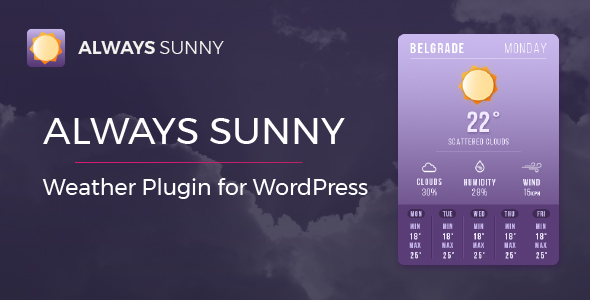
If you want in depth weather reports for your WordPress site, then the Always Sunny Plugin is probably one to consider. It offers a wide range of data with numerous implementation options for your website to give your site’s users up-to-date and in-depth information.
There are two excellent ways you can add the plugin details to your site. The first is a widget that can be inserted into any sidebar or footer. Another is the embedded shortcode that you can add into any part of the website’s design.
And instead of just the usual weather information such as weather patterns and temperatures, you can also display other weather information such as cloud coverage and wind patterns. This makes it a great plugin for businesses like outdoor leisure facilities and local tourist centers to use.
Highlights:
-
Responsive website that can be implemented into your website in numerous ways.
-
Good for businesses who require more than just the temperature and general weather patterns.
-
Great looking styles to give your website that extra style.
-
Easy to install and start using.
aWeather Forecast
For a little style when displaying weather on your website, the aWeather Forecast plugin is something that you need to consider. It has a range of animated icons and headers to add a little life into your website’s weather forecasting. You can also customize the colors of the display to match your current branding.
It is also another WordPress weather widget plugin that offers you lots of weather information. Some of the details it can display include: wind speed, wind direction, pressure, humidity and general weather conditions.
The temperatures can also be displayed in numerous formats including Fahrenheit, Celsius, and Kelvin. You also have the choice of over 700 Google Fonts.
Highlights:
-
Animation to give life to your weather forecasting.
-
Lots of customization to help you match your current website’s branding.
-
Excellent coding that won’t slow down your website.
-
Accurate weather reports that include a lot of information.
Location Weather
This is an amazing WordPress weather widget plugin that has some of cleanest coding for your website. The plugin can make your website look even more attractive than it already is and you can be sure that it will display well on any device and screen size.
It is minimalist and lightweight, so the speed of your website won’t be affected. Premium features allow for users to have auto-location for weather reports and allow you to hide current wind speed if you want to.
Highlights:
-
A beautiful WordPress weather plugin for your website.
-
Will fit seamlessly into your current design.
-
Can customize so users can auto-detect their location for weather reports.
-
Lightweight so won’t impact website speed.
Weather Atlas Widget
This is one of the more unique Weather apps for WordPress on the list. This is due to the real-time fetching of weather forecasts that can be displayed within its intuitive design. There are a lot of customization options for your site so you can match the look of the weather functions on your website with your branding.
Users will be able to see the current weather conditions or look for long-term forecasts through the on-page interface.
Installing the interface onto your website couldn’t be easier. You just need to grab the shortcode from the plugin once installed and then paste that into the widget where you would like the weather to be displayed on your website.
One of the best features of this WordPress Weather plugin that differentiates it from others is that there is no limit to the country. Users from across the world can use the website with this app on. And it supports multiple languages including English, Spanish, Chinese and Russian.
Another really cool feature about this WordPress app is that this background color can change. You can set it to change depending on the local temperature. The text color can also automatically change to best contrast with the background. Alternatively, you can choose your own background color.
Highlights:
-
A free app with plenty of functionality.
-
Color options for the temperature make this a really interesting app to interact with.
-
Supports lots of languages.
-
Can give long-term and current weather forecasts for not just the USA.
Final Thoughts For The Top WordPress Weather Widget Plugins
A weather function on your website is something that can really make you standout from the crowd. A good weather app can help you stand out from the crowd, give your website visitors information they need and want and also help them to make informed decisions. There are numerous options available for your to use on your website and therefore there is certainly going to be a good weather app for you to use.
Related Posts




 Website Maintenance – Use Promocode: scanwp
  Advanced JetPlugins for Elementor
  Semrush 14 days trial
  Kinsta – Managed WordPress Hosting
  Bluehost Hosting